
The repetitive work of the design office, with your company's rules, in one panel.
ANALİTİK ASİSTAN codes the SOLIDWORKS assembly tree with your own part numbering scheme, prepares drawings and production outputs, tracks revisions and keeps outdated drawings off the shop floor.
- SOLIDWORKS 2020 and later
- With or without PDM
- Interface in English or Turkish
- Your data stays in your company
Sounds familiar?
ANALİTİK ASİSTAN was patiently developed by a mechanical engineer with 36 years of machine design experience. It matured through daily use on real projects in the design office of a machine builder; the problems it solves showed up in production, not at the desk.
Parts sit in the vault as "Part1" or "Copy of Shaft"; nobody knows who left what unfinished.
A new revision is out, but the paper at the machine is old. The mistake shows only after the part is cut.
Drawings, PDF, DXF, STEP and the bill of materials are prepared one by one, with the same clicks, for every project.
Parts with an empty material, finish or description go to the ERP and to purchasing as they are.
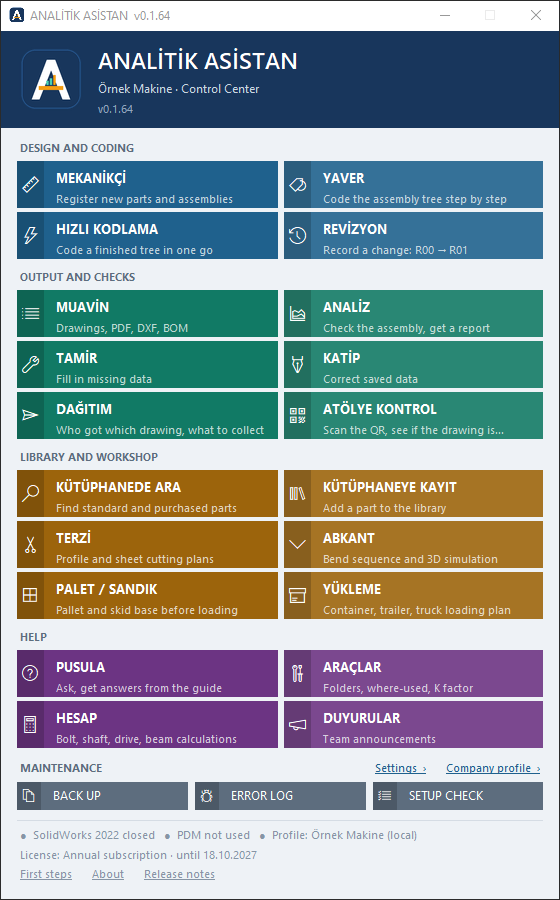
One module per job, all in the same panel
The program connects to SOLIDWORKS once and stays open all day; it also has its own tab in the SOLIDWORKS task pane, where modules can be opened too. Modules are grouped by job. Module names are the program's own (Turkish) names.
- MEKANİKÇİ Opens a new part from the company template, already numbered and with its properties filled: free, parametric, profile, standard or purchased part. Assembly, group and project records. KILAVUZ suggestions for material, heat treatment, finish, tolerances and GD&T.
- YAVER Walks the assembly tree and brings each item without a part number to you in turn. Saves the file under its number in the right folder, repoints the assembly and moves the drawing too. The last step can be undone.
- HIZLI KODLAMA Numbers a whole project tree in one go when the data is already in the model. Shows the plan first; if anything blocks, no file is touched.
- REVİZYON R00 → R01 without changing the part number or file name. A change note is required; if the part is no longer interchangeable, a new number is suggested instead.
- MUAVİN Drawings (one by one or in bulk), PDF, DXF, DWG, STEP, JPG and QR. Bill of materials to Excel; import files for Odoo, Logo, Netsis or Mikro.
- ANALİZ Checks the whole tree of the top assembly against your company's rules and produces a colour-coded Excel report. Writes to no file.
- TAMİR Fixes what ANALİZ found from a single screen; opens the right module for anything more than a single field.
- KATİP Corrects all custom properties of released parts in bulk (protected fields such as number and material stay locked) and regenerates the PDFs. The table can also be corrected in Excel.
- DAĞITIM Which drawing went to whom, at which revision. Lists what to collect back when the revision goes up.
- ATÖLYE KONTROL The drawing's QR code is scanned on the shop-floor computer; the screen says "GÜNCEL" (current) or "ESKİ RESİM" (outdated) in large letters.
- KÜTÜPHANEDE ARA Finds standard and purchased parts and shows where similar ones are; drag the part into the assembly. The ERP catalogue tab finds a product in your ERP and adds it to the assembly.
- KÜTÜPHANEYE KAYIT Adds a new standard or purchased part to the library, in the right folder with the right data.
- TERZİ Lowest-waste cutting plan for profile bars with offcut stock; sheet nesting and DXF; sheet-metal flat patterns.
- ABKANT The bend sequence of a sheet-metal part, step by step in 3D; die, punch, back gauge and force. Shows collisions and suggests a collision-free sequence.
- PALET / SANDIK Skid pallet and closed crate before loading: deck, skids and posts to Eurocode 5 and TIS/GDV rules; tipping warning, seaworthy packing (desiccant, ISPM 15, handling marks), PDF report, Excel cutting list, part and assembly model in SOLIDWORKS; sends the plan to YÜKLEME.
- YÜKLEME Loading plan for machines, crates and pallets in containers, trailers or trucks: how many vehicles, which item goes where, centre of gravity. 3D view, PDF and Excel.
- PUSULA Answers your question from the program's manual: exact answers where the rule is clear, quotes from the manual otherwise.
- ARAÇLAR Show file in folder, where used, file info, K-factor calculation, raw material size and assembly diagram.
- HESAP Bolt tightening torque, shaft diameter, bearing life, motor and gearbox, belt, chain, gear, beam, weld and cylinder calculations; PDF calculation report.
- DUYURULAR Announcements of new rules or changes to the design team; unread ones show on the panel.
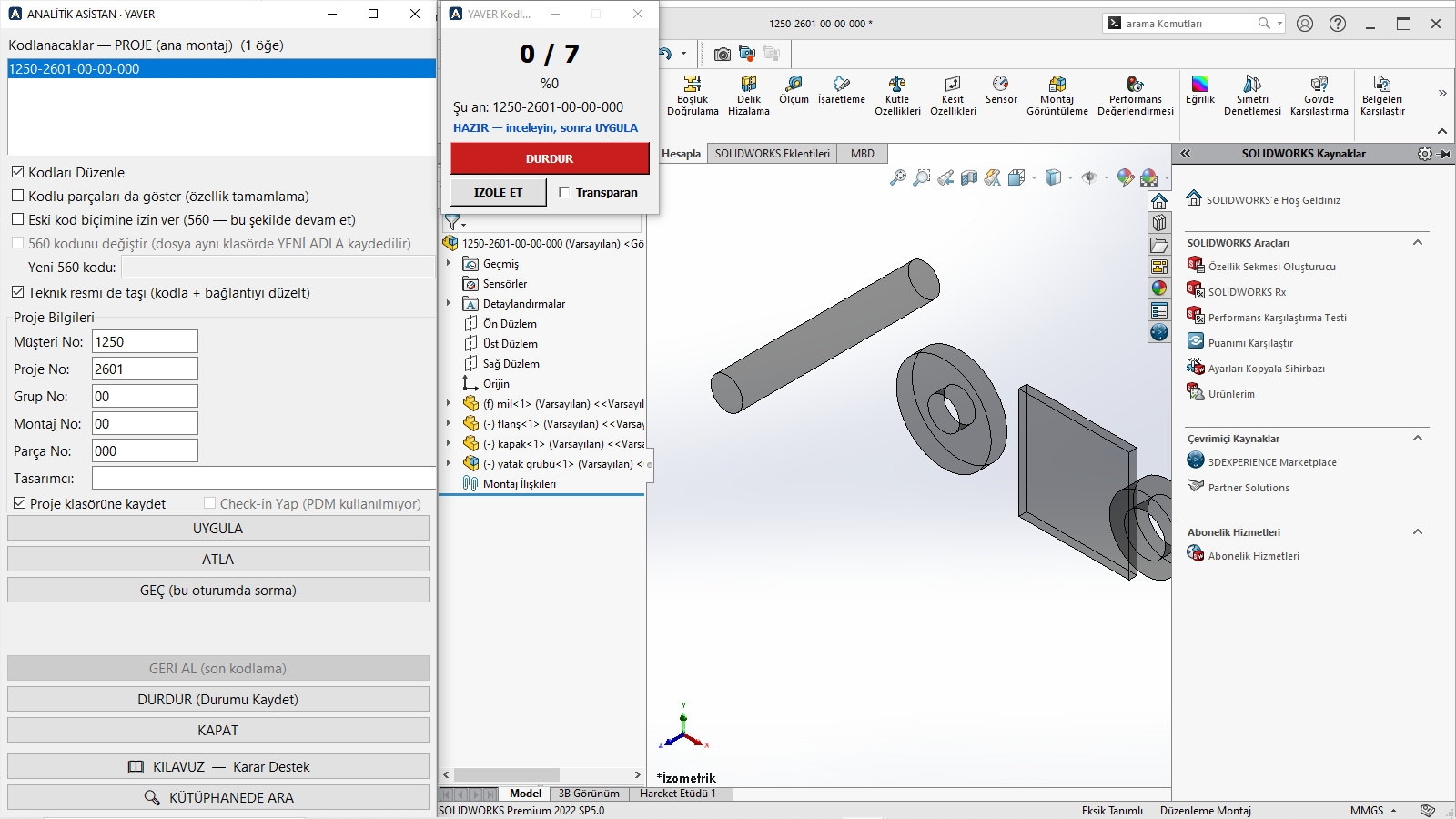
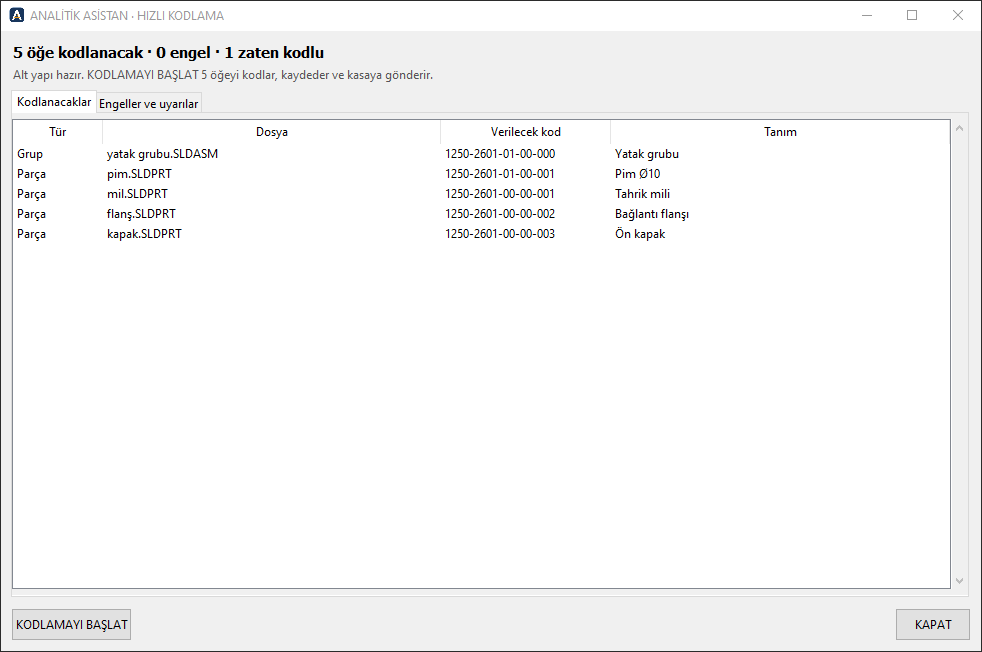
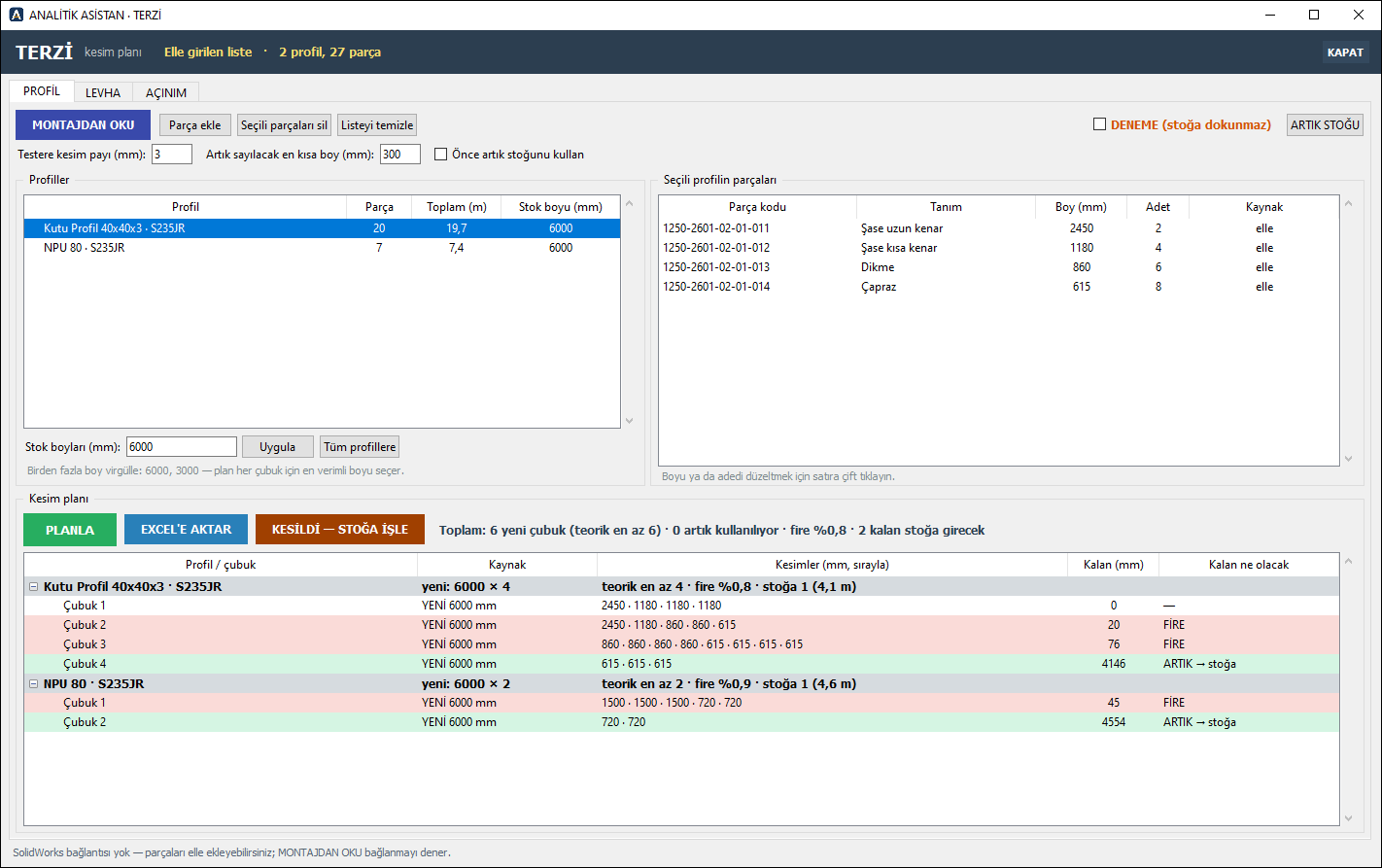
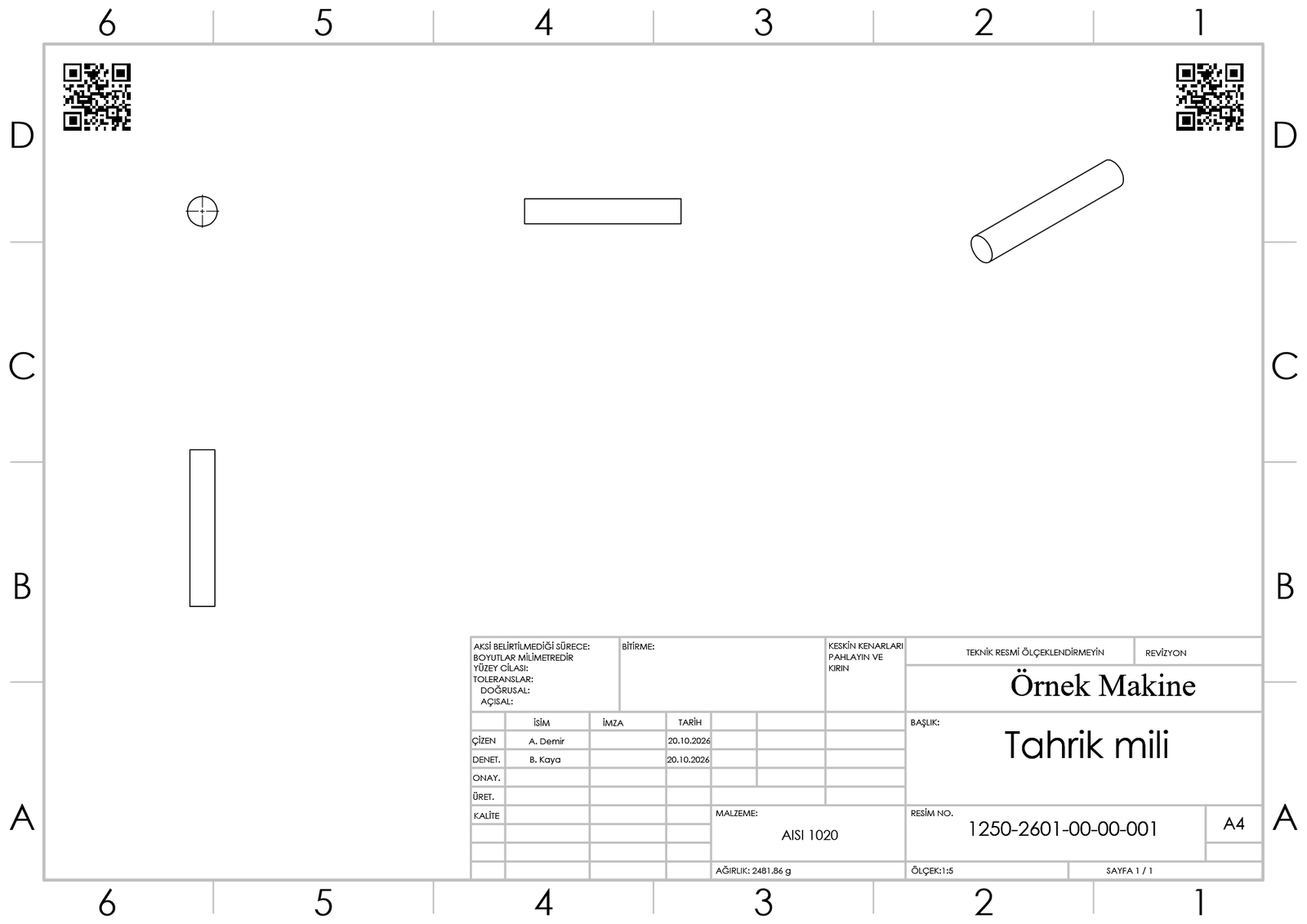
Screenshots taken from the program itself (Turkish interface); company and numbers are examples.
Three safeguards against production from outdated drawings
The part number and file name never change with a revision, so assembly, drawing and vault history stay intact. Each safeguard can be switched on or off for your company during setup.
The old PDF disappears
When the new revision is output, old PDF and DXF files move to an archive folder and their pages are stamped "INVALID".
The drawing identifies itself
The QR code holds the number and revision. Scanned on the shop floor, it is compared with the shared revision record; no server, no SOLIDWORKS needed.
Who has what is known
Which drawing went to whom at which revision is recorded. When the revision goes up, the list of copies to collect back is ready.
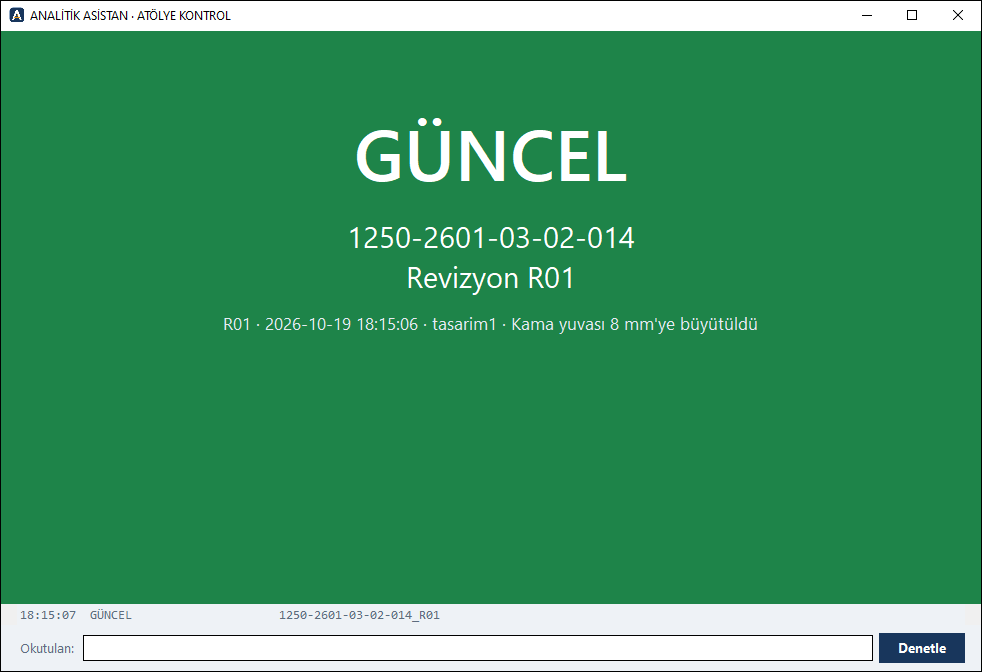
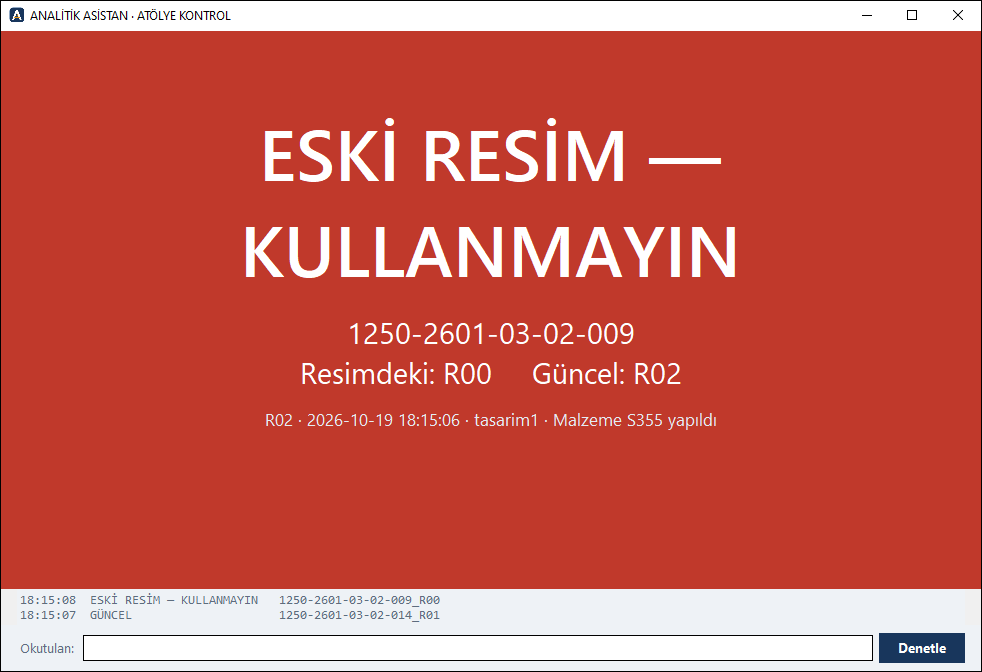
ATÖLYE KONTROL — on the shop-floor computer, with a USB QR scanner.
The program adapts to you, not the other way round
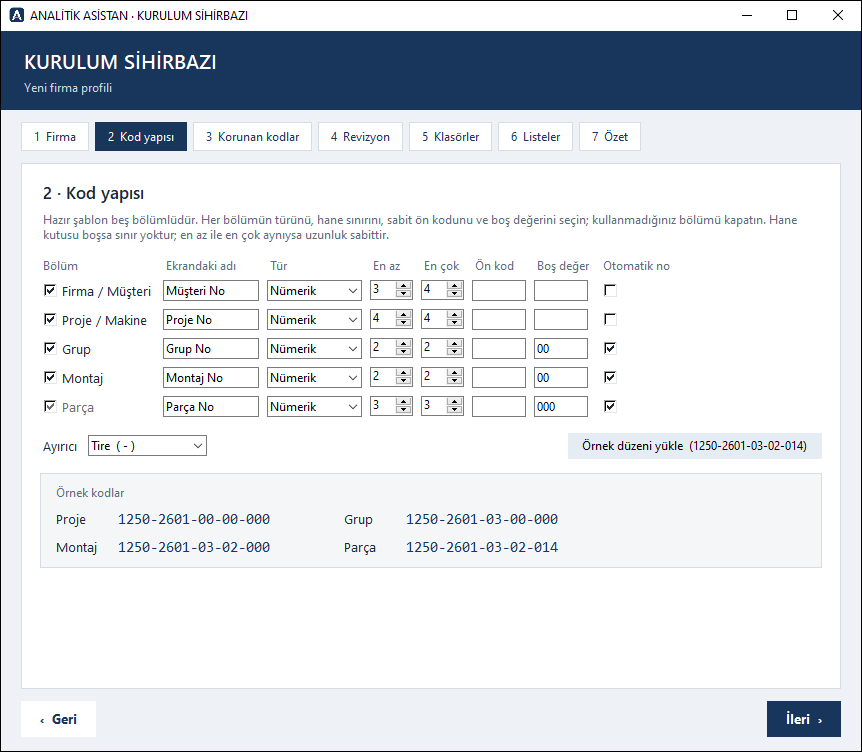
Every company has its own numbering logic. The setup wizard asks for yours; from then on the program numbers, checks and reports only by that rule.
- Define your numbering scheme Five ready sections: company/customer, project/machine, group, assembly, part. For each: letters or digits, how many characters, a fixed prefix; separator and automatic numbering. Switch off the sections you don't use.
- Choose the rules Machines whose numbers must never change, revision format and the three revision safeguards, folders, drop-down lists.
- The groundwork sets itself up Missing folders, drop-down lists and templates are created, starting from SOLIDWORKS's own templates; nothing existing is touched.
- The whole team uses one profile The profile lives once in a shared folder; other computers connect to it, so numbering rules never drift apart. An infrastructure check finds and fixes gaps.
Works with how you work today
The program finds the installed version itself.
Works with a SOLIDWORKS PDM Professional vault or with plain network folders.
Installed on the computer running SOLIDWORKS; no separate server needed.
Interface, messages and reports in English or Turkish; you choose on the Welcome screen or in SETTINGS. A company set up in English also gets English SOLIDWORKS property names (Part Code, Raw Material…). Module names (YAVER, MUAVİN…) stay the same. The user guide is in English and Turkish.
Your data stays in your company
The program sends none of your design data to us or anywhere else: numbers, QR codes, reports and the revision record are produced and kept on your own computers and network. Only for licence activation and the trial record does it send the licence text, a one-way computer ID and the program version to analitikasistan.com (details). If you turn on the Odoo connection, stock cards and the product structure go only to your own Odoo.
One licence, all modules
Licences are per designer and renewed yearly. No module selection needed. Enterprise quotes for multi-user companies.
Purchased by quote: write to us; invoicing and payment are agreed in the quote.
Request a quote- All modules: coding, output, checking, revisions, cutting plans, library
- All updates during the year
- Support by e-mail
- With or without PDM
- Everything in the annual licence
- Multi-user setup: shared server or SOLIDWORKS PDM
- Installation and user training
- Customisation and development for your company
The SOLIDWORKS licence is not included; ANALİTİK ASİSTAN works alongside your SOLIDWORKS.
Need something the modules don't cover?
If your design office has a recurring job that no module handles, tell us; we will look at it together as a company-specific adaptation or a new module. Most ANALİTİK ASİSTAN modules were born from requests like this in a design office. Describe your need.
Questions you may have
Which SOLIDWORKS versions does it support?
SOLIDWORKS 2020 and later. The program detects the installed version itself.
Is the program available in English?
Yes, since version 0.1.53: choose English on the Welcome screen or in SETTINGS. All modules, Excel and PDF reports and messages are in English; a company set up in English also gets English folder and list names and, since version 0.1.61, English SOLIDWORKS property names (Part Code, Raw Material, Standard Part…); the program reads both Turkish and English property names. Module names (YAVER, MUAVİN…) are product names and stay the same. The user guide is in English too (PDF and web page).
Do we need SOLIDWORKS PDM?
No. It works with a PDM vault if you have one, otherwise with your project folders on the network. You choose during setup.
Can we keep our own numbering scheme?
Yes; that is what it was built for. The setup wizard asks for your scheme section by section and shows example numbers as you go.
Can it damage our existing files?
ANALİZ and ARAÇLAR only read. YAVER numbers each part with your confirmation; HIZLI KODLAMA shows the plan first and does not start if anything blocks. After each step the changed documents are verified on disk; if one cannot be written, the job stops.
Does our data leave the company?
Your design data does not. The program uses no cloud service and sends none of your files, numbers or reports to us or anywhere else. The shop-floor QR check also uses the shared record inside your company. There are two exceptions: for licence activation and the trial record, the licence text, a one-way computer ID and the program version go to analitikasistan.com (details); and with the Odoo connection you turn on, stock cards and the product structure are sent to your own Odoo only.
How do we buy?
Try the demo with all modules for 30 days, then write to us for a quote with the number of designers. Invoicing and payment are agreed in the quote; the signed licence file is sent by e-mail and activates without an internet connection.
Try it free for 30 days
Download the demo and try it on your own assemblies. All modules are enabled.
or write to: iletisim@analitikasistan.com