
Home › Cutting plans and nesting
Profile cutting optimisation, sheet nesting, flat patterns and press brake bend simulation
How many profile bars to order is often a guess, offcuts lying in the shop are forgotten and waste grows. TERZİ builds the cutting plan from the assembly, uses offcut stock first and books what was cut into stock; sheet nesting and flat patterns are in the same window, and ABKANT plans the bend sequence. It also works with a manually entered list while SOLIDWORKS is closed.
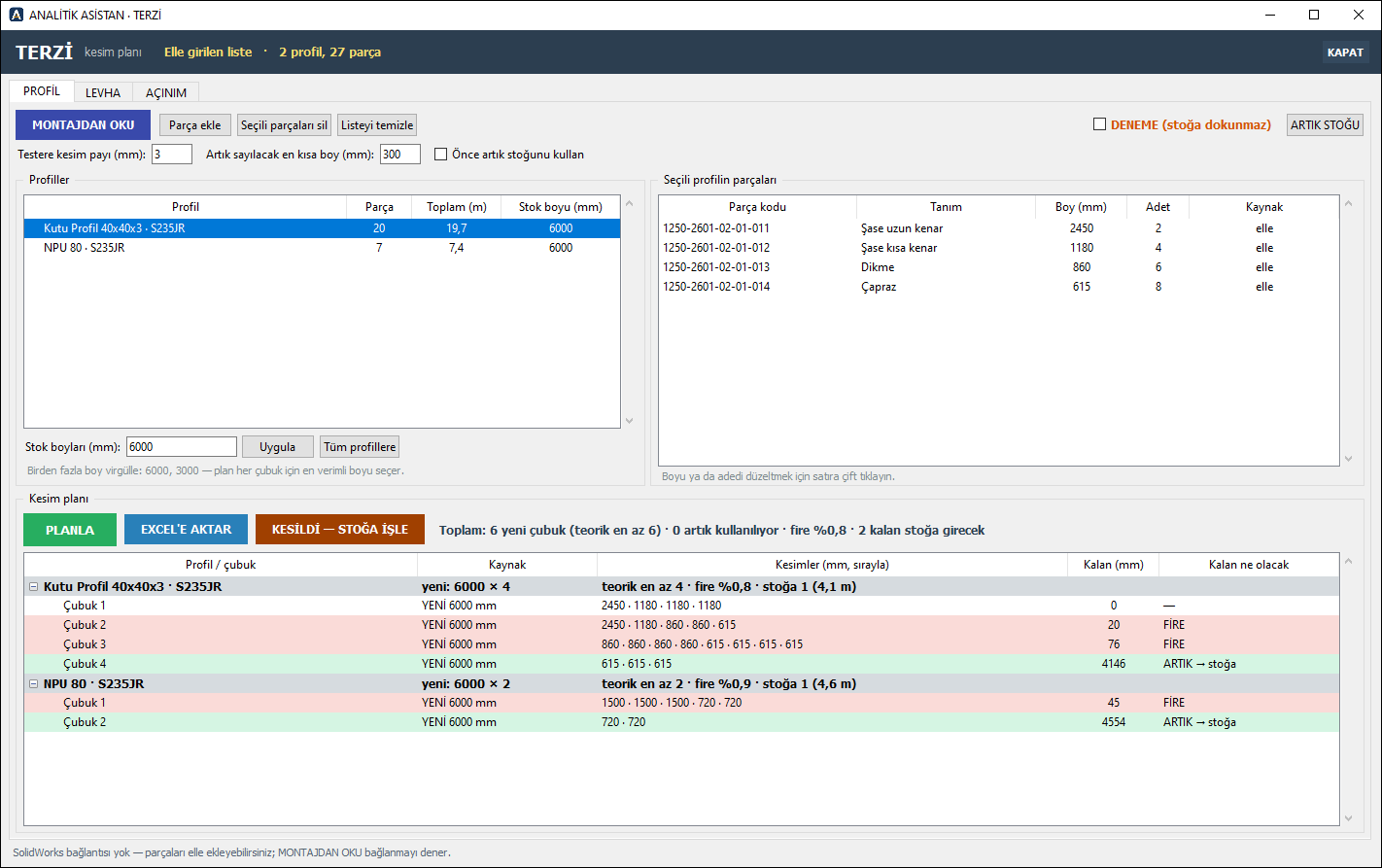
Profile cutting plan (optimisation)
- READ FROM ASSEMBLY: profile parts are grouped by section and material; quantities are project totals. The assembly is only read; no file is changed.
- SOLIDWORKS weldment (structural member) parts are read too; each bar's length is measured from its body.
- Stock lengths (more than one possible) and saw kerf are yours; the plan picks the best length for each bar and shows waste and offcuts going to stock.
- Offcut stock lives in a shared folder, so the whole team sees the same stock: on CUT, used offcuts are deducted, long remainders get a number and go to stock; the next plan uses offcuts first.
- TRIAL box: try a plan without touching the shared stock.
- Excel list for the shop floor; a coloured bar chart of the plan with a workshop PDF; a profile purchasing list. Profile stock lengths in a shared table.
Sheet nesting
- Parts are added from the assembly, from DXF, or manually as rectangles.
- Cutting gaps per machine, sheet stock; PDF and DXF per sheet.
- Manual corrections by drag and drop on the canvas, with undo.
Sheet-metal flat patterns
- Flat patterns from SOLIDWORKS sheet-metal data: DXF or DWG; flat patterns sorted into material-thickness subfolders.
- Shared bend table (material, thickness, inner radius, K-factor): K TABLOSUNU UYGULA writes the table's K to the bends, does not change the bend radius, and reports parts that do not match.
- A combined DXF per material-thickness group: flat patterns side by side, each with “NUMBER x QTY” below — one file for cutting. (Not nesting; that is done in sheet nesting.)
- Cut length, number of bends, sheet thickness and flat size are written to the part's properties; the Excel report also has cut length and bend columns.
- K-FACTOR calculation in ARAÇLAR: bend allowance and deduction, K from a measured part; the bend table opens from there too.
ABKANT: press brake bend sequence and 3D simulation
- The bends of a SOLIDWORKS sheet-metal part (angle, direction, inner radius, line in the flat pattern) are read from the model; the program compares its own bend calculation with the bent part in SOLIDWORKS.
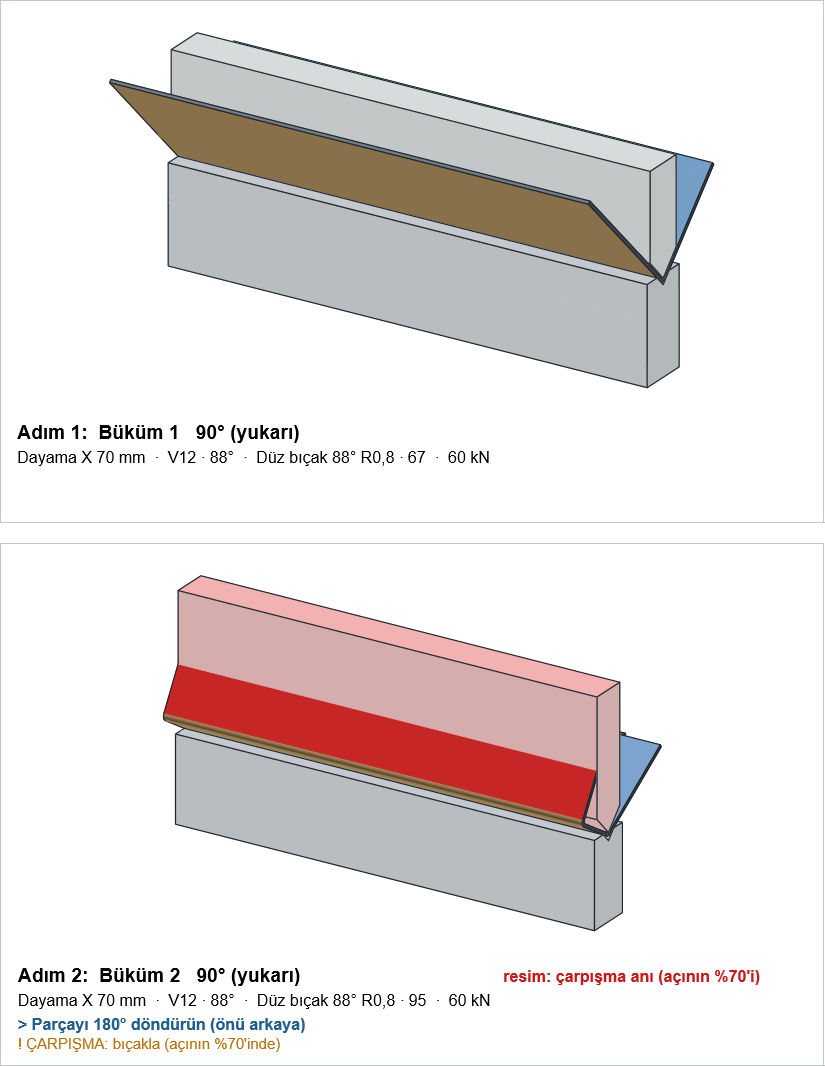
- The bend sequence is shown step by step in 3D; for each step the die, punch, back gauge position, bending force and when to turn the part over.
- Warns when a flange is too short for the die, or the force exceeds the machine or the tooling.
- Collision check: every step is checked against the punch, die, upper beam, lower table and side frames; colliding faces are shown in red in the 3D view and in the report. If you have not chosen the punch yourself, other suitable punches (long straight, gooseneck) are tried automatically.
- SIRA ÖNER (suggest sequence): searches for a collision-free bend sequence with few part turns and few tool changes; the suggested sequence is applied only after you confirm it.
- PDF bend report for the shop floor: flat pattern, step table and a picture of each step; the plan is saved with the project.
- Punches, dies and machines are in your company's Excel table; it comes with a ready set of European-style tooling. It also opens from TERZİ's flat-pattern list.
Mitred profile cuts are not planned yet. Combined DXF and cut length are for DXF output only; the bend table has so far been tested on base-flange bends. ABKANT is a geometric simulation; it does not replace a trial bend on the shop floor or the machine program.
Try it free for 30 days
All modules enabled. Interface and user guide in English or Turkish.
Download demo
or write to: iletisim@analitikasistan.com